
Introduction
Sportradar Synergy Basketball API surfaces Synergy's vast basketball analytics dataset making it programmatically accessible for integration into media platforms, scouting systems, coaching tools, data visualizations, and more. Data originates from Synergy Sports' proprietary tracking and tagging system. Every player action from professional, collegiate, and international games is manually logged and quality-controlled by Synergy analysts. Game data is typically available within 4 hours after the game is completed.
Under the hood, Synergy Sports catalogs every player action from thousands of games per year—across pro, college, and international basketball—surfacing enriched metadata (play types, lineups, shot coordinates) onto every event/possession. The Synergy API also tracks players throughout their careers using the player career endpoints, providing a comprehensive look at games, players, and teams going back 20+ years.
API Map
To best utilize the Synergy Basketball API, you will need specific parameters to create your API calls. The map below shows every feed in the API, grouped by task. The key at the top marks the identifier each feed takes, and each entry links out to its endpoint page for full details.
Every path begins with a league (nba, wnba, ncaamb, ncaawb, nbdl, or international). The Competitions, Seasons, and Teams feeds can be called with no other identifiers and provide the season, team, and competition IDs the remaining feeds take; Games provides game IDs, the Players feeds provide player IDs, and the Player Careers feeds provide career IDs.
Pagination
In order to reduce the amount of data returned from the API, results are paginated when they are returned. When this happens a response will have details of the total number of records that are available to be returned. The request will also have skip and take parameters to control which pages should be returned. For example skip=0 and take=50 will return the first 50 records, skip=50 and take=50 will return the second 50 records. And so on.
Shot Coordinates
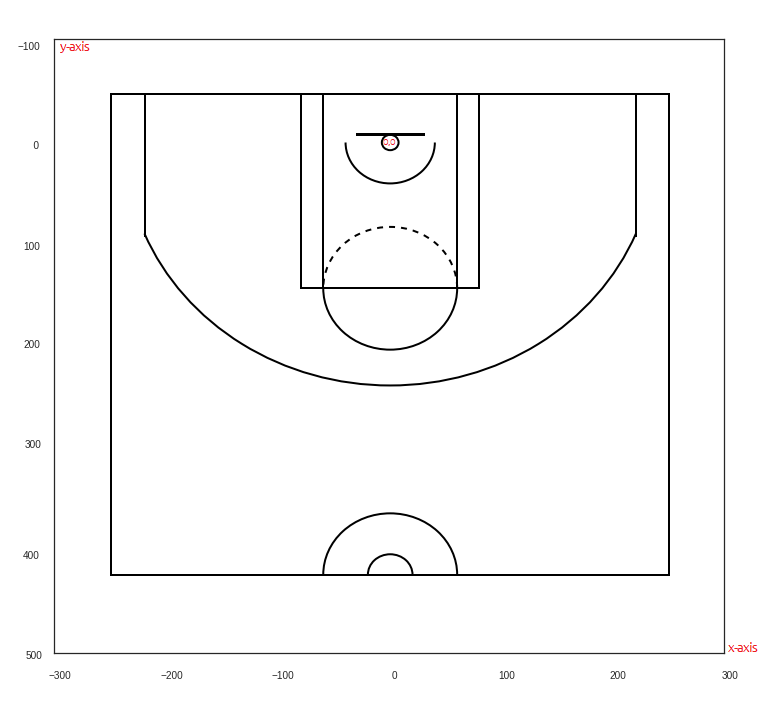
Possession events have shotX and shotY properties, which can be used to plot a chart of all the shot events that happened during a game. All the coordinates are relative to (0,0) position which represents the hoop on the offense side. The left side of the hoop is marked with negative values on the x-axis and positive values for the right side.
Negative values on the y-axis mean that the shot was made from behind the hoop. y-axis values over the 500 mean that the ball was thrown from the other half court.
Pick and Roll
A pick and roll occurs when an offensive player without the ball screens (or stands in the path of) the defensive player that is defending the ball. The ball handler then dribbles around the screen while the screener rolls to the basket or pops to the perimeter.
Player Types
Possession events return various player types i.e. prPlayer, sdPlayer, oPlayer, dPlayer, bPlayer, sPlayer and rPlayer. Here are the descriptions for these:
sPlayer: Related specifically to Pick-And-Roll. Small defender player (sPlayer) is the player defending the ball handler in a pick and roll.bPlayer: Related specifically to Pick-And-Roll. Big defender player (bPlayer) is the player defending the screener in a pick and roll.oPlayer: Offensive player or Attacker is the player who uses the possession by shooting the ball, turning the ball over, or getting fouled.dPlayer: Defensive player is the player that is tagged as defending the oPlayer. Not all possessions for an oPlayer will include a tag for a dPlayer. In a P/R situation this will be the player who defends the resulting action (like a spot-up or pick/pop).rPlayer: Root Player is the player that started the event with the ball on offense who then passes it (typically) to the oPlayer who then uses the possession by shooting, turning the ball over, or getting fouled. Root Players only exist for some of the Play Types Synergy logs i.e. ISO, P/R Ball Handler, Post Up.prPlayer: Primary Player (The primary player is typically the player that "caused" the non-possession event or used the possession by shooting the ball turning the ball over, or getting fouled. It can be a defensive player in foul situations or an offensive player (with respect to the possession it's attached to).sdPlayer: Secondary Player - this field is specifically for the player that has been fouled when the Primary Player commits a non-shooting foul.
Court Sample
Below is an example of an NBA half-court, which has a width of 500px and height of approximately 470px.
Integration Resources
OpenAPI Specification
Download our Synergy Basketball v1 OpenAPI spec here!
Postman Workspace
Run in PostmanOur full Media API suite—including the Synergy Basketball collection—lives in our public Postman workspace. Fork or follow any collection to get updates automatically.

MCP Server
The Sportradar Synergy Basketball MCP Server is a Model Context Protocol (MCP) implementation that bridges AI assistants directly to our Synergy Basketball API feeds. It allows LLMs to use standardized tools to fetch our sports data, helping to power your applications, assist in coding, and streamlining your integration.
For detailed instructions on how to set up and use this integration, visit our MCP Server documentation.
More Questions?Visit our Synergy Basketball FAQ for more info