
Tracking Live Games
This integration scenario explains how to track and render a live MLB game experience using the Sportradar MLB API. It covers how to discover games, retrieve real-time game data from all live-updating game endpoints, and combine Play-by-Play, Boxscore, and Pitch Metrics data to power scoreboards, timelines, and pitch analytics.
This scenario is commonly used to:
- Power live game centers and second-screen experiences
- Render real-time scoreboards and inning state
- Display pitch-by-pitch sequences and at-bat timelines
- Trigger scoring alerts and key moment updates
- Support broadcast-style pitch and velocity graphics
Overview
All MLB game endpoints update during live play.
From an integration perspective:
- Game Play-by-Play provides pitch-level sequencing and event order
- Game Play Statistics provides detailed pitch-level hitting, pitching, and fielding statistics for each play
- Game Boxscore provides inning-by-inning scoring and team totals
- Game Pitch Metrics provides pitch type and velocity analytics
- Game Summary and Game Extended Summary provide starting lineups, game-specific rosters, and in-depth game statistics for the same
game.id
These endpoints all use the game.id and can be combined to build a complete live game experience.
Applications typically:
- Use schedule feeds to discover the
game.id - Poll live game endpoints during play
- Render score state, event timelines, and pitch metrics
- Continue polling until game status becomes
closed
Relevant Feeds
| Feed | Purpose |
|---|---|
| League Schedule / Daily Schedule | Discover games and retrieve game.id values |
| Game Play-by-Play | Retrieve pitch-level and at-bat-level live events |
| Game Play Statistics | Retrieve pitch-level hitting, pitching, and fielding statistics for each play |
| Game Boxscore | Retrieve inning-by-inning scoring and totals |
| Game Pitch Metrics | Retrieve pitch type and velocity metrics |
| Game Summary | Retrieve live lineups, game rosters, and in-game statistics |
| Game Extended Summary | Retrieve live lineups, game rosters, expanded game statistics, and pregame season context |
| Event Tracking | Retrieve detailed tracking metrics for a specific event (via event_id) |
| Glossary | Translate pitch type and outcome IDs |
Push Feeds (Reduce Polling & Save Calls)
In addition to RESTful polling, the MLB API provides Push Feeds for real-time streaming updates. Push feeds deliver incremental game updates as they occur, helping reduce the number of REST calls required during live play.
Push feeds are ideal for high-frequency live experiences where minimizing polling and saving API calls is important.
Integrate a RESTful BackupAlways be prepared to call the corresponding RESTful endpoint if the Push stream is interrupted or disconnected. REST feeds should be used to retrieve the full current game state and for recovery if needed.
Available Push Feeds
| Push Feed | RESTful Counterpart | Purpose |
|---|---|---|
| Push Events | Game Play-by-Play | Real-time pitch and event updates |
| Push Statistics | Game Summary Game Extended Summary | Real-time statistical updates |
| Push Linescores | Game Boxscore | Real-time scoring and inning updates |
| Push Probable Pitchers | n/a | Real-time probable pitcher updates |
For implementation details and connection guidance, see the Push Feed Integration Guide.
High-Level Workflow
A typical live game integration follows this flow:
Schedule → Game ID → Initial REST Call → Push Subscription (Optional) → Live Rendering → REST Reconciliation (if needed)
- Retrieve a schedule feed and identify the target
game.id - Begin retrieving live updates via REST polling or Push feeds
- Render scoreboard, event timeline, pitch analytics, and lineup/roster context
- Continue polling until the game status becomes
closed
Initialize Then PushIf using Push feeds, first make an initial REST call to retrieve the full current game state, then subscribe to the appropriate Push feed for incremental updates.
Integration Steps
1. Discover the Game IDs You Need
Live tracking is performed per game.
Use:
- League Schedule for full season navigation
- Daily Schedule for date-based live pages
Extract and store the desired game.id. Learn more in our Pulling Schedules guide.
2. Start with Game Play-by-Play (Primary Live Driver)
Game Play-by-Play is the authoritative live event stream and should be treated as the primary sequencing source during a game.
You can optionally pair this feed with Game Play Statistics to enrich each pitch and at-bat with detailed hitting, pitching, and fielding outcomes.
GET https://api.sportradar.com/mlb/{access_level}/v8/{language_code}/games/{game_id}/play_by_play.{format}Use the Game Play-by-Play feed to:
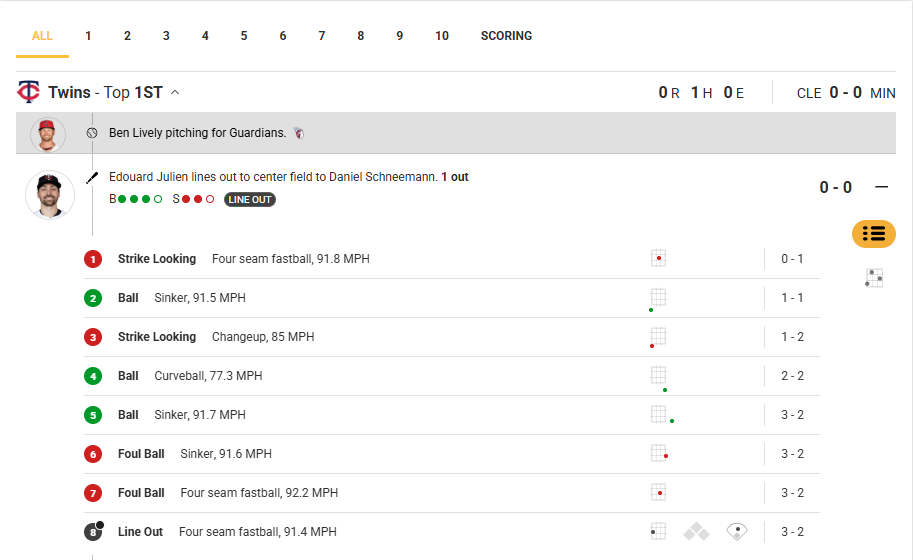
- Render pitch-by-pitch history
- Track count (balls, strikes, outs)
- Detect hits, walks, strikeouts, and scoring events
- Update base runner state
- Build an event timeline ordered by
sequence_number - Correlate events with detailed statistical outcomes from Game Play Statistics
Process events using sequence_number or event id to detect new activity between polls.
 "events": [
              {
                "at_bat": {
                  "hitter_id": "fcb6b23a-cace-4dc1-bc05-e12378183fbc",
                  "id": "60cef943-ad37-4ef5-a75c-6fd15d348729",
                  "hitter_hand": "L",
                  "pitcher_id": "32a615d1-9a88-4cd0-be2f-d8f1d731715e",
                  "pitcher_hand": "R",
                  "sequence_number": 2,
                  "description": "Edouard Julien lines out to center field to Daniel Schneemann.",
                  "hitter": {
                    "preferred_name": "Edouard",
                    "first_name": "Edouard",
                    "last_name": "Julien",
                    "jersey_number": "47",
                    "id": "fcb6b23a-cace-4dc1-bc05-e12378183fbc",
                    "full_name": "Edouard Julien"
                  },
                  "pitcher": {
                    "preferred_name": "Ben",
                    "first_name": "Edward",
                    "last_name": "Lively",
                    "jersey_number": "39",
                    "id": "32a615d1-9a88-4cd0-be2f-d8f1d731715e",
                    "full_name": "Ben Lively"
The following example shows how Play-by-Play events can be rendered as an inning timeline, including pitch outcomes, pitch types, velocities, and the evolving count within each at-bat.
3. Enrich Key Plays with Event Tracking
When a Play-by-Play event is interesting enough to warrant deeper tracking detail, such as a home run, hard-hit ball, or notable pitch, call Event Tracking using the event_id from Play-by-Play.
GET https://api.sportradar.com/mlb/{access_level}/v8/{language_code}/games/{game_id}/events/{event_id}/tracking.{format}This feed provides in-depth tracking data for all players on the field during that specific event, including pitchers, hitters, baserunners, and fielders.
Use this feed to:
- Retrieve granular pitch and batted-ball tracking data
- Capture defensive positioning and player movement metrics
- Enrich highlight moments with advanced contextual overlays
Event Tracking is most commonly used for the most high-impact or high-interest plays.
Enrich Plays with Detailed StatisticsYou can also reference Game Play Statistics to capture the full statistical outcome of the play across hitting, pitching, and fielding before or alongside tracking data.
4. Update the Scoreboard with Game Boxscore
Game Boxscore provides structured scoring breakdowns.
GET https://api.sportradar.com/mlb/{access_level}/v8/{language_code}/games/{game_id}/boxscore.{format}Use this feed to:
- Display inning-by-inning scoring lines
- Render total runs, hits, and errors
- Show win/loss records and game metadata
- Detect extra innings using
final.inning
This feed is ideal for scoreboard components.
5. Add Pitch Analytics with Game Pitch Metrics
Game Pitch Metrics provides aggregated pitch-level statistics for each pitcher in the game.
GET https://api.sportradar.com/mlb/{access_level}/v8/{language_code}/games/{game_id}/pitch_metrics.{format} <player preferred_name="Justin" first_name="Justin" last_name="Topa" jersey_number="48" id="2c49a12d-9242-43e0-b6b7-d2588b46ff77" full_name="Justin Topa" status="A" position="P" primary_position="RP">
<statistics>
<pitch_metrics>
<overall count="12" avg_speed="90.1" min_speed="83" max_speed="94.7" gbfb="0">
<onbase h="2" s="2" d="0" t="0" hr="0"/>
<outcome klook="3" kswing="1" ktotal="9" foul="2" btotal="3"/>
<outs klook="0" kswing="0" ktotal="0"/>
<in_play linedrive="0" groundball="3" popup="0" flyball="0"/>
<swings total="6" swing_rate="50" strike_pct="8.3" whiff_rate="16.7"/>
</overall>
<pitch_types>
<pitch_type type="CH" count="2" avg_speed="86.1" min_speed="85.9" max_speed="86.2" gbfb="0">
<onbase h="1" s="1" d="0" t="0" hr="0"/>
<outcome klook="0" kswing="0" ktotal="1" foul="0" btotal="1"/>
<outs klook="0" kswing="0" ktotal="0"/>
<in_play linedrive="0" groundball="1" popup="0" flyball="0"/>
<swings total="1" swing_rate="50" strike_pct="0" whiff_rate="0"/>
</pitch_type>
<pitch_type type="CT" count="3" avg_speed="91.4" min_speed="90.7" max_speed="92.3" gbfb="0">
<onbase h="1" s="1" d="0" t="0" hr="0"/>
<outcome klook="1" kswing="0" ktotal="2" foul="0" btotal="1"/>
<outs klook="0" kswing="0" ktotal="0"/>
<in_play linedrive="0" groundball="1" popup="0" flyball="0"/>
<swings total="1" swing_rate="33.3" strike_pct="0" whiff_rate="0"/>
</pitch_type>Use this feed to:
- Display pitch type distribution (FA, SL, CH, etc.)
- Render average, minimum, and maximum velocity
- Show swing, strike, and whiff metrics
- Power broadcast-style pitch mix graphics
Pitch type codes and outcome identifiers should be translated using the Glossary feed.
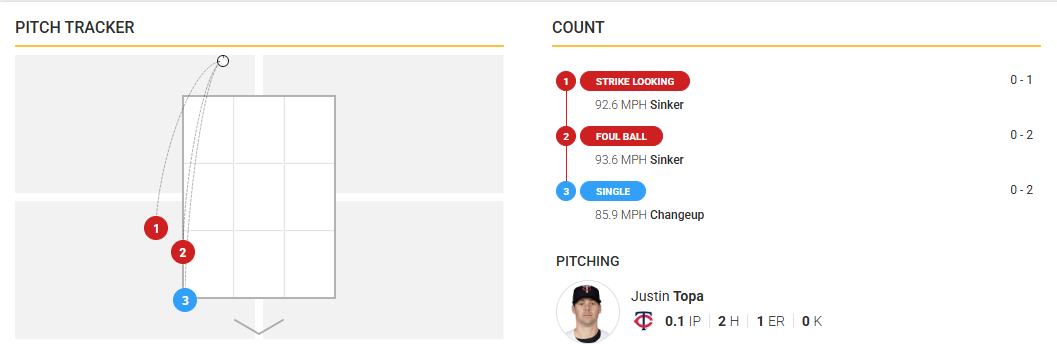
Pitch Location DataPitch location data is available within Game Play-by-Play. When combined with Game Pitch Metrics, you can render advanced pitch tracking visuals, including plotted pitch locations and pitch sequence overlays.
The following example shows how pitch metrics and pitch location data (from Game Play-by-Play) can power a pitch tracker view, pairing plotted pitch positions with a per-pitch sequence and count.
6. Pull In-Game Statistics
Use Game Summary or Game Extended Summary to retrieve in-game statistical details alongside live game state.
These feeds are also useful prior to first pitch to track confirmed lineups and game rosters, which become available once officially posted.
Game Summary
GET https://api.sportradar.com/mlb/{access_level}/v8/{language_code}/games/{game_id}/summary.{format}Game Extended Summary
GET https://api.sportradar.com/mlb/{access_level}/v8/{language_code}/games/{game_id}/extended_summary.{format}Use these feeds to:
- Render starting lineups, ordered by batting position (
order) - Map lineup position codes (1–12) to defensive roles
- Render full game rosters (starters, bench, bullpen)
- Detect and display lineup changes using
sequence,inning, andinning_half - Surface live team and player game statistics
- Optionally display pregame season context (season-to-date totals) alongside the lineup view
Leverage Deeper StatisticsUse Game Extended Summary when deeper statistical detail or substitution tracking is required.
Best Practices
- Poll according to the MLB update frequency guidance.
- Refer to endpoint caching guidance by checking the
cache-controlresponse header, since TTL may change while games are live. - Monitor
game.statusto handle transitions such asscheduled,inprogress,delayed, andclosed. Full definitions are available in the Glossary feed. - Use Play-by-Play as the primary sequencing source, Game Play Statistics for detailed per-play statistical outcomes, and Boxscore for structured scoreboard rendering.
- Use the Glossary to translate pitch types, outcomes, lineup positions, and game status codes.
- Pitch speed and location are expected for MLB home venues, but may be unavailable for some Spring Training or non-MLB venues. In limited scenarios, boxscore-only coverage may continue if pitch-level data is unavailable.
- For testing, you can replay past games as though they were live using Sportradar Simulations.
Updated 7 months ago