
MLB API Basics
Intro
Sportradar’s MLB data is delivered via a RESTful API. Requests are authenticated using the API authentication credentials configured in your account.
Data is available in JSON or XML format.
Technical Requirements
To integrate with Sportradar API feeds, your application must meet the following requirements:
- Support TLS 1.2 or higher for all inbound and outbound connections
- Support API key based authentication for RESTful requests
- Be capable of consuming and parsing JSON or XML responses
- Support standard HTTP methods and status codes used by RESTful APIs
- For Push feeds, support persistent connections and event-driven data handling
API Style
The MLB API is a Sportradar League-Based API designed specifically for Major League Baseball. It provides data for the preseason, regular season, postseason, All-Star Game, and World Baseball Classic competition.
The API includes primary and supporting feeds that expose league, season, game, team, and player identifiers, along with schedules, standings, rosters, and statistics. Game-centric feeds provide real-time play-by-play, box score, and game summary data throughout live events.
Note: While the MLB API follows the same league-based structure as other US sports APIs, it does not align with Sportradar’s Global Baseball APIs, which may use different identifiers, data models, and coverage rules.
Key Features
Key features of the MLB API include:
- Official MLB data normalized into Sportradar’s US API format
- Primary feeds for schedules, standings, rosters, and team data
- Game centric feeds with real-time play by play and box score updates
- Player and team statistics generated during games and finalized post game
- Statcast data with advanced pitch and batted ball metrics
- XML and JSON data delivery via RESTful endpoints
Related Baseball APIs
Sportradar also offers a Global Baseball API, which provides coverage for baseball leagues and competitions worldwide, using a separate data model and identifier structure.
Data Collection
Official MLB data is collected on venue by MLB trained statistics teams and ingested directly by Sportradar.
Data flow and accuracy are monitored by Sportradar’s Data Entry team, and the data is transformed into a consistent US API format aligned with other League-Based APIs while preserving baseball-specific rules and structures.
If league-level data issues occur, Sportradar production teams may provide temporary coverage to ensure continuity until official data is restored.
Versioning
The MLB API is currently available in multiple supported versions, with v8 being the latest version. Supported versions and deprecation timelines follow Sportradar’s Versioning Policy.
To access a specific version of the MLB API, include the desired version in the request path. New integrations should always target the latest supported version unless otherwise advised.
Refer to the MLB Change Log for details on version updates, enhancements, and deprecations.
Data Flow and Retrieval
The MLB API organizes data into focused endpoints, or feeds. For example, to retrieve the league schedule, use the League Schedule feed. To retrieve live or completed game data, use game centric feeds such as Game Play by Play, Game Boxscore, or Game Summary.
Each feed has a clearly defined purpose to allow efficient and targeted data retrieval. Depending on your use case, different feeds and pull frequencies will be required. Use the MLB Endpoints section for endpoint documentation and interactive examples.
Most feeds require the use of unique identifiers such as season IDs, game IDs, team IDs, or player IDs. These identifiers are retrieved from higher level feeds like Seasons, League Schedule, or Team Profile. See the ID Handling page for details on how MLB identifiers are structured and reused across feeds.
Here is a retrieval path for a player profile.
Step 1

First, make a request to the League Hierarchy or Teams endpoint.
See the Endpoint Descriptions section for data to be found in each feed.
Locate the unique Id of the team who employs this player.
Step 2
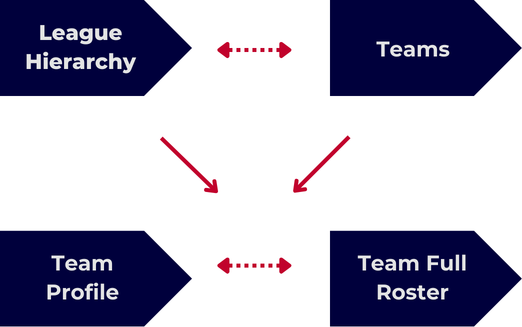
Second, make a request to the Team Profile or Team Full Roster feed using your found team Id and locate the unique player id.
Step 3
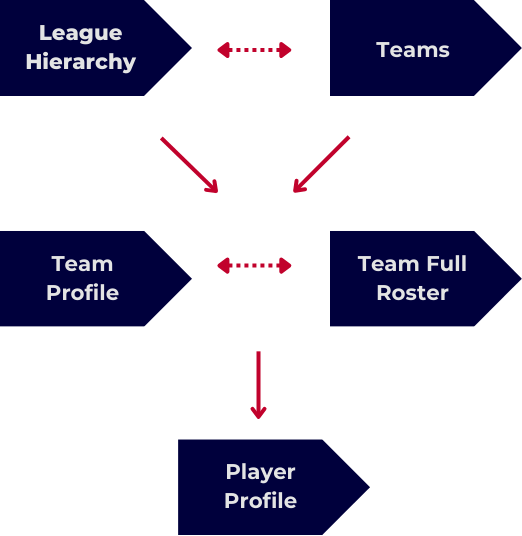
Third, make a request to the Player Profile feed to find player biographical info, draft info, and seasonal stats.
All MLB API feeds will follow this pulling logic. Visit our Integration Scenarios section for specific retrieval scenarios.
You can also reference our MLB API Map to get a sense of how the entire API is interconnected.
RESTful & Push
Most of our MLB endpoints are RESTful, but we also include complementary Push Feeds for Realtime customers.
With RESTful feeds, a request must be made whenever a data update is needed. For our Push feeds, one request will open up a streaming connection. Data is then delivered in a continuous stream indefinitely.
Push feeds correlate to the RESTful endpoints, but are not necessarily 1:1 in parity. For example, the Push Events feed follows the same format, and includes nearly all of the same data, as the Game Play-by-Play RESTful endpoint. And Push Statistics correlates to Game Summary.
For increased data speed, and less API requests, many customers use Push. Though it is important to note that Push feeds are not meant to replace the RESTful data, but to enhance it. RESTful feeds should always be used as the backbone of the MLB API.
See our Push Feeds section for more info.
Change Log
The MLB API includes a Change Log feed that highlights endpoint changes, data enhancements, and version updates.
This feed should be monitored regularly to stay informed of new data points, deprecated fields, or required integration changes. See our Monitoring Data Changes guide for more details on integrating the Change Log.
Pagination
The MLB API does not currently use pagination. Each request returns all available data for the requested resource.
Additional Integration Options
Postman Workspace

Our entire Media APIs are available on Postman. Click the link above to be taken directly to our MLB API collection.
Feel free to follow and/or fork any collections to receive updates.
Schema Download
Open the zip file below to access our entire MLB API XSD schema.
Simulations
Check out our Simulations to replay actual games at any time, on your own schedule.
More Questions?Check our MLB API FAQ or reach out to our support team at [email protected]
Updated about 2 months ago