
Pulling Schedules
This integration scenario explains how to retrieve MLB schedules using the Sportradar MLB API. It focuses on discovering seasons, selecting the correct schedule feed for your use case, and understanding how schedule data connects to downstream game and statistics feeds.
This scenario is commonly used to:
- Build season calendars
- Display upcoming and completed games
- Discover
game.idvalues for use in live or historical game data integrations
Overview
In the MLB API, schedules serve as the entry point for most integrations. Before accessing live play-by-play, box scores, standings, or historical statistics, applications should first retrieve schedule data to identify available seasons and games.
Before You Start: Schedule Timing and Updates
MLB schedules are typically published in the summer prior to the start of the regular season, though updates may occur throughout the year.
Common reasons schedule data may change include:
- Weather delays, postponements, and reschedules
- Doubleheader adjustments
- Postseason series updates (including
if-necessarygames) - Venue or broadcast changes
Best PracticeRefresh schedule data according to its update frequency to ensure the latest updates are captured.
Before requesting schedule data for a season year, use the Seasons feed to confirm which seasons are currently supported.
Relevant Feeds
The following feeds are used when pulling MLB schedules:
| Feed | Purpose |
|---|---|
| Seasons | Discover available seasons and season types (PRE, REG, PST, AST, WBC) |
| Daily Schedule | Retrieve games for a specific MLB-defined day |
| League Schedule | Retrieve the full schedule for a season year and season type |
| Daily Summary | Retrieve daily game schedules with team lineups and team/player statistics |
| Series Schedule | Retrieve postseason series structure, participants, and associated games |
| Daily Change Log | Detect when schedule-related updates occur |
High-Level Workflow
A typical schedule integration follows this flow:
Seasons → Schedule → Game IDs → Downstream Feeds
- Identify available seasons and season types
- Retrieve the season schedule (or daily schedule)
- Extract
game.idvalues - Use game IDs for live or historical game data
Integration Steps
1. Discover Available Seasons
Start by calling the Seasons feed to determine which season years and season types are available.
GET https://api.sportradar.com/mlb/{access_level}/v8/{language_code}/league/seasons.{format}This ensures your application only requests data for supported years and helps you select the correct season_year and season_type.
Why this matters
- Season availability can vary across products and historical depth
- Prevents invalid schedule requests for unsupported years
- Establishes the baseline for current and historical scheduling
2. Retrieve Schedule Data
Choose the schedule feed that best matches your workflow:
-
Use League Schedule when you need the complete schedule for a season.
-
Use Daily Schedule when you only need games for a single day.
-
Use Daily Summary when you need a schedule plus context, such as:
- Team lineups
- Team and player statistics
- Game-level metadata for a specific day
-
Use Series Schedule during the postseason to understand series structure, participants, and
if-necessarygames.
Example: League Schedule
GET https://api.sportradar.com/mlb/{access_level}/v8/{language_code}/games/{season_year}/{season_type}/schedule.{format}<league xmlns="http://feed.elasticstats.com/schema/baseball/v8/schedule.xsd" alias="MLB" name="Major League Baseball" id="2fa448bc-fc17-4d3d-be03-e60e080fdc26">
<season-schedule id="d8c3c9ac-8002-4e1f-be49-8ad3958550d0" year="2026" type="REG">
<games>
<game id="fffbffca-9da3-4f35-870b-71075d9114bd" status="scheduled" coverage="full" game_number="1" day_night="N" scheduled="2026-07-31T01:40:00+00:00" home_team="d52d5339-cbdd-43f3-9dfa-a42fd588b9a3" away_team="a7723160-10b7-4277-a309-d8dd95a8ae65" double_header="false" entry_mode="STOMP" reference="823271">
<venue name="Petco Park" market="San Diego" capacity="40222" surface="grass" address="100 Park Boulevard" city="San Diego" state="CA" zip="92101" country="USA" id="0ab45d79-5475-4308-9f94-74b0c185ee6f" field_orientation="N" stadium_type="outdoor" time_zone="US/Pacific">
<location lat="32.70752890000001" lng="-117.1568083"/>
</venue>
<home name="Padres" market="San Diego" abbr="SD" id="d52d5339-cbdd-43f3-9dfa-a42fd588b9a3" win="0" loss="0"/>
<away name="Giants" market="San Francisco" abbr="SF" id="a7723160-10b7-4277-a309-d8dd95a8ae65" win="0" loss="0"/>
</game>
<game id="ffefe83b-3945-4956-b2e1-779c4e3c69ae" status="scheduled" coverage="full" game_number="1" day_night="N" scheduled="2026-05-20T23:05:00+00:00" home_team="a09ec676-f887-43dc-bbb3-cf4bbaee9a18" away_team="1d678440-b4b1-4954-9b39-70afb3ebbcfa" double_header="false" entry_mode="STOMP" reference="823547">
<venue name="Yankee Stadium" market="New York" capacity="47309" surface="grass" address="One East 161st Street" city="Bronx" state="NY" zip="10451" country="USA" id="706e9828-6687-4ac8-a409-3fb972e8bae9" field_orientation="E" stadium_type="outdoor" time_zone="US/Eastern">
<location lat="40.8288189" lng="-73.9265691"/>
</venue>
<home name="Yankees" market="New York" abbr="NYY" id="a09ec676-f887-43dc-bbb3-cf4bbaee9a18" win="0" loss="0"/>
<away name="Blue Jays" market="Toronto" abbr="TOR" id="1d678440-b4b1-4954-9b39-70afb3ebbcfa" win="0" loss="0"/>
</game>
<game id="ffee8cf2-1109-46a0-8dd9-133cb159553b" status="scheduled" coverage="full" game_number="1" day_night="N" scheduled="2026-09-25T23:07:00+00:00" home_team="1d678440-b4b1-4954-9b39-70afb3ebbcfa" away_team="c874a065-c115-4e7d-b0f0-235584fb0e6f" double_header="false" entry_mode="STOMP" reference="822760">
<venue name="Rogers Centre" market="Toronto" capacity="39150" surface="turf" address="One Blue Jays Way" city="Toronto" state="ON" zip="M5V1J3" country="CAN" id="84d72338-2173-4a90-9d25-99adc6c86f4b" field_orientation="N" stadium_type="retractable" time_zone="US/Eastern">
<location lat="43.6417388" lng="-79.3892547"/>
</venue>
<home name="Blue Jays" market="Toronto" abbr="TOR" id="1d678440-b4b1-4954-9b39-70afb3ebbcfa" win="0" loss="0"/>
<away name="Reds" market="Cincinnati" abbr="CIN" id="c874a065-c115-4e7d-b0f0-235584fb0e6f" win="0" loss="0"/>
</game>The League Schedule feed returns:
- Scheduled start times and venues
- Game status (e.g.,
scheduled,inprogress,postponed,closed) - Home/away teams and metadata (doubleheaders, day/night, broadcasts)
- Season context for the returned games
Each game includes a unique game.id, which is required for retrieving game-centric data.
3. Build Team-Specific Schedules (Optional)
While MLB does not provide a standalone “team schedule” endpoint, team schedules are built by filtering schedule data.
-
Retrieve the League Schedule for the desired
season_yearandseason_type -
Filter games where:
home_teamoraway_team
matches the desiredteam.id
-
Sort or group games by date for display
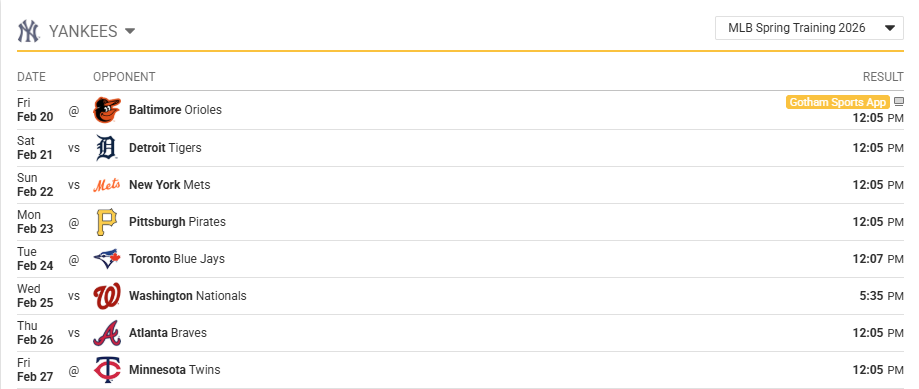
This image shows an example of a rendered team schedule, demonstrating how MLB schedule data can be used to display opponents, game dates, and start times for a specific team.
4. Handle Doubleheaders and Rescheduled Games
Two games between the same teams on the same day are a doubleheader. Each game keeps its own game.id, and two fields on every game say how the pair relates:
double_headeristrueon both games.game_numberis1for the first game and2for the second. A single game carries1.
MLB plays two kinds. In a traditional doubleheader the second game starts shortly after the first ends, so the schedule gives game 2 an estimated start a little over three hours after game 1 and both games usually share a day_night value. In a split doubleheader the games have separate start times, typically an afternoon game (D) and an evening game (N) five hours or more apart. The feeds do not label the type; the gap between the two scheduled values and the day_night pair tell them apart.
Doubleheaders are often makeups. When a postponed game is rescheduled, it keeps its game ID and moves to the new date, usually as game 2 against the same opponent. The moved game carries its original start time and the reason for the move: in JSON a rescheduled array with from and reason, in XML a rescheduled_from element with a reason attribute. A stored game ID therefore stays valid across a postponement; only the date, game_number, and double_header change. The Game Status Workflow page covers the status flow of a postponed game.
The Cubs at Guardians doubleheader of 5 April 2026 shows both patterns at once: game 1 at 1:10 PM Eastern, and game 2 at 4:30 PM, which was the game postponed from the evening before. The Daily Schedule for that day, cut to the two games:
{
  "league": {
    "alias": "MLB",
    "name": "Major League Baseball",
    "id": "2fa448bc-fc17-4d3d-be03-e60e080fdc26"
  },
  "date": "2026-04-05",
  "games": [
    {
      "id": "3f36ffff-1961-4a81-84d9-e91472e5b0c9",
      "sr_id": "sr:match:63299947",
      "status": "closed",
      "coverage": "full",
      "game_number": 1,
      "day_night": "D",
      "scheduled": "2026-04-05T17:10:00+00:00",
      "home_team": "80715d0d-0d2a-450f-a970-1b9a3b18c7e7",
      "away_team": "55714da8-fcaf-4574-8443-59bfb511a524",
      "duration": "2:37",
      "double_header": true,
      "entry_mode": "STOMP",
      "reference": "824459",
      "gameday_type": "P",
      "venue": {
        "name": "Progressive Field",
        "market": "Cleveland",
        "capacity": 34788,
        "surface": "grass",
        "address": "2401 Ontario Street",
        "city": "Cleveland",
        "state": "OH",
        "zip": "44115",
        "country": "USA",
        "id": "2b0ccd49-4d87-4996-ac4d-27ffc7ee4c16",
        "sr_id": "sr:venue:8087",
        "field_orientation": "N",
        "stadium_type": "outdoor",
        "time_zone": "US/Eastern",
        "location": {
          "lat": "41.4957048",
          "lng": "-81.6852732"
        }
      },
      "home": {
        "name": "Guardians",
        "market": "Cleveland",
        "abbr": "CLE",
        "id": "80715d0d-0d2a-450f-a970-1b9a3b18c7e7",
        "sr_id": "sr:competitor:3650",
        "win": 5,
        "loss": 4
      },
      "away": {
        "name": "Cubs",
        "market": "Chicago",
        "abbr": "CHC",
        "id": "55714da8-fcaf-4574-8443-59bfb511a524",
        "sr_id": "sr:competitor:3627",
        "win": 4,
        "loss": 4
      },
      "broadcasts": [
        {
          "network": "CLEG",
          "type": "Internet",
          "locale": "Home"
        },
        {
          "network": "MARQ",
          "type": "TV",
          "locale": "Away",
          "channel": "664"
        }
      ]
    },
    {
      "id": "9feaf3fe-7165-4815-a456-70edee5fb497",
      "sr_id": "sr:match:70559336",
      "status": "closed",
      "coverage": "full",
      "game_number": 2,
      "day_night": "D",
      "scheduled": "2026-04-05T20:30:00+00:00",
      "home_team": "80715d0d-0d2a-450f-a970-1b9a3b18c7e7",
      "away_team": "55714da8-fcaf-4574-8443-59bfb511a524",
      "attendance": 19791,
      "duration": "2:57",
      "double_header": true,
      "entry_mode": "STOMP",
      "reference": "824460",
      "gameday_type": "P",
      "venue": {
        "name": "Progressive Field",
        "market": "Cleveland",
        "capacity": 34788,
        "surface": "grass",
        "address": "2401 Ontario Street",
        "city": "Cleveland",
        "state": "OH",
        "zip": "44115",
        "country": "USA",
        "id": "2b0ccd49-4d87-4996-ac4d-27ffc7ee4c16",
        "sr_id": "sr:venue:8087",
        "field_orientation": "N",
        "stadium_type": "outdoor",
        "time_zone": "US/Eastern",
        "location": {
          "lat": "41.4957048",
          "lng": "-81.6852732"
        }
      },
      "home": {
        "name": "Guardians",
        "market": "Cleveland",
        "abbr": "CLE",
        "id": "80715d0d-0d2a-450f-a970-1b9a3b18c7e7",
        "sr_id": "sr:competitor:3650",
        "win": 6,
        "loss": 4
      },
      "away": {
        "name": "Cubs",
        "market": "Chicago",
        "abbr": "CHC",
        "id": "55714da8-fcaf-4574-8443-59bfb511a524",
        "sr_id": "sr:competitor:3627",
        "win": 4,
        "loss": 5
      },
      "broadcasts": [
        {
          "network": "MARQ",
          "type": "TV",
          "locale": "Away",
          "channel": "664"
        },
        {
          "network": "CLEG",
          "type": "Internet",
          "locale": "Home"
        }
      ],
      "rescheduled": [
        {
          "from": "2026-04-04T23:15:00+00:00",
          "reason": "postponed"
        }
      ]
    }
  ]
}
<?xml version="1.0" ?>
<?xml-stylesheet type="text/xsl" charset="UTF-8" href="/xslt/baseball/v8/schedule.xsl"?>
<!-- Generation started @ 2026-10-09 14:42:21 +0000 -->
<league xmlns="http://feed.elasticstats.com/schema/baseball/v8/schedule.xsd" alias="MLB" name="Major League Baseball" id="2fa448bc-fc17-4d3d-be03-e60e080fdc26">
<daily-schedule date="2026-04-05">
<games>
<game id="3f36ffff-1961-4a81-84d9-e91472e5b0c9" sr_id="sr:match:63299947" status="closed" coverage="full" game_number="1" day_night="D" scheduled="2026-04-05T17:10:00+00:00" home_team="80715d0d-0d2a-450f-a970-1b9a3b18c7e7" away_team="55714da8-fcaf-4574-8443-59bfb511a524" duration="2:37" double_header="true" entry_mode="STOMP" reference="824459" gameday_type="P">
<venue name="Progressive Field" market="Cleveland" capacity="34788" surface="grass" address="2401 Ontario Street" city="Cleveland" state="OH" zip="44115" country="USA" id="2b0ccd49-4d87-4996-ac4d-27ffc7ee4c16" sr_id="sr:venue:8087" field_orientation="N" stadium_type="outdoor" time_zone="US/Eastern">
<location lat="41.4957048" lng="-81.6852732"/>
</venue>
<home name="Guardians" market="Cleveland" abbr="CLE" id="80715d0d-0d2a-450f-a970-1b9a3b18c7e7" sr_id="sr:competitor:3650" win="5" loss="4"/>
<away name="Cubs" market="Chicago" abbr="CHC" id="55714da8-fcaf-4574-8443-59bfb511a524" sr_id="sr:competitor:3627" win="4" loss="4"/>
<broadcasts>
<broadcast network="CLEG" type="Internet" locale="Home"/>
<broadcast network="MARQ" type="TV" locale="Away" channel="664"/>
</broadcasts>
</game>
<game id="9feaf3fe-7165-4815-a456-70edee5fb497" sr_id="sr:match:70559336" status="closed" coverage="full" game_number="2" day_night="D" scheduled="2026-04-05T20:30:00+00:00" home_team="80715d0d-0d2a-450f-a970-1b9a3b18c7e7" away_team="55714da8-fcaf-4574-8443-59bfb511a524" attendance="19791" duration="2:57" double_header="true" entry_mode="STOMP" reference="824460" gameday_type="P">
<venue name="Progressive Field" market="Cleveland" capacity="34788" surface="grass" address="2401 Ontario Street" city="Cleveland" state="OH" zip="44115" country="USA" id="2b0ccd49-4d87-4996-ac4d-27ffc7ee4c16" sr_id="sr:venue:8087" field_orientation="N" stadium_type="outdoor" time_zone="US/Eastern">
<location lat="41.4957048" lng="-81.6852732"/>
</venue>
<home name="Guardians" market="Cleveland" abbr="CLE" id="80715d0d-0d2a-450f-a970-1b9a3b18c7e7" sr_id="sr:competitor:3650" win="6" loss="4"/>
<away name="Cubs" market="Chicago" abbr="CHC" id="55714da8-fcaf-4574-8443-59bfb511a524" sr_id="sr:competitor:3627" win="4" loss="5"/>
<broadcasts>
<broadcast network="MARQ" type="TV" locale="Away" channel="664"/>
<broadcast network="CLEG" type="Internet" locale="Home"/>
</broadcasts>
<rescheduled_from reason="postponed">2026-04-04T23:15:00+00:00</rescheduled_from>
</game>
<!-- ... omitted for brevity -->
</games>
</daily-schedule>
</league>
<!-- Generation ended @ 2026-10-09 14:42:21 +0000 -->Order games yourself. Neither the Daily Schedule nor the League Schedule returns games in start-time order, and the two games of a doubleheader can be separated by other games in the list (on 5 April, game 1 is the fifth entry and game 2 the tenth). Sort by scheduled, and by game_number for games that share a start time. Treat game 2's start time in a traditional doubleheader as an estimate, and follow game 1's live status to know when game 2 is close.
5. Track Schedule and Status Changes
Schedule changes occur throughout the season due to weather, operational decisions, and postseason logic.
Key fields to monitor include:
status(e.g.,scheduled,wdelay,postponed,suspended,closed)scheduled(start time)double_header,game_numbervenueandbroadcasts(when applicable)
Use the Daily Change Log to detect updates without repeatedly pulling large schedule payloads.
GET https://api.sportradar.com/mlb/{access_level}/v8/{language_code}/league/{year}/{month}/{day}/changes.{format}This helps conserve call limits while ensuring your application reflects the most current dates, start times, and statuses. Treat schedule feeds as the source of truth for timing.
6. Use Game IDs in Other Integrations
After retrieving schedule data, store or cache each game.id for use in other scenarios, including:
- Live game tracking (Play-by-Play, Game Summary, Boxscore)
- Postponed and suspended game handling
- Historical game retrieval and season statistics workflows
Your platform can then use schedule discovery as the foundation for live and historical data pipelines.
Common Use Cases
Pulling schedules supports many common integration needs, such as:
- Displaying upcoming games by date
- Showing completed games and results
- Powering scoreboard views and game detail pages
- Driving calendar-based views and notifications
- Supporting postseason series views and
if-necessarylogic - Linking schedule data to live play-by-play and box score updates
Best Practices
- Call Seasons before requesting schedules for the first time
- Do not hardcode game dates, series outcomes, or IDs
- Cache schedule responses and refresh according to the update frequency
- Treat schedule feeds as the authoritative source for timing and game status
- Sort games by
scheduled, thengame_number: schedule feeds do not return games in start-time order - Use
game.idas the primary key for game-centric data and downstream integrations
Updated 2 days ago