
Building Team Rosters
This integration scenario explains how to build MLB team rosters using the Sportradar MLB API. It focuses on discovering team.id values, selecting the right roster endpoint for your use case (active roster vs. full roster vs. depth chart), and monitoring roster movement using league-wide feeds like Transactions, Free Agents, and Injuries.
This scenario is commonly used to:
- Render a team roster page (active players, jersey numbers, positions)
- Build depth charts by position and role (SP/RP, IF/OF, etc.)
- Track roster availability and status changes (injuries, minors, free agents, transactions)
Overview
Roster building typically starts with a team identifier. Once you have a team.id, you can retrieve roster data at different levels of detail depending on whether you need:
- A current team snapshot (in-season roster context)
- A broader organization roster view (includes many minor league players)
- A position-based depth chart for lineup and availability visuals
Rosters are most accurate when you pair team-level roster feeds with league-wide movement feeds:
- Daily Transactions for roster changes during the season (signings, activations, options, assignments)
- Free Agents for players currently not rostered to a team
- Injuries for availability and IL designations
- League Depth Charts for a league-wide depth chart view across all teams
Roster Contexts to Plan For
Rosters change based on timing and competition context. Your integration should account for:
- In-season rosters: active roster and day-to-day availability changes
- Off-season rosters: player movement continues even when games are not being played
- Spring Training rosters: additional invitees and roster churn can be higher than regular season
If your product displays specific roster constructs such as the 40-man roster, 26-man active roster, or game-active players, align your UI to the roster fields available in the feeds you select.
The 40-man roster represents all players under major league contract and eligible for promotion to the active roster, while the 26-man roster represents the players eligible to participate in MLB games during the regular season.
Pair roster feeds with Transactions and Injuries to keep these views current as players are activated, optioned, designated, or placed on injured lists.
Roster, Depth Chart, and Injury UpdatesRosters and Depth charts are updated throughout the season.
For Injuries, Sportradar monitors official roster updates and injury reports. When a player is placed on or removed from an injured list, or when injury details change, the associated player record is updated in the Injuries feed accordingly.
Before You Start: IDs and Common Codes
Team IDs
You will use team.id throughout roster workflows. You can discover team IDs using:
Player status codes
Player objects commonly include status values. Examples include:
A= ActivatedD7,D10,D15,D60= Injured list variantsBRV= Bereavement ListFA= Free AgentMIN= MinorsNRI= Non-roster InviteRET= RetiredSUS= SuspendedW= Waivers- Blank or null = Traded or not activated (often temporary after trade)
Lineup positions and roster position codes
Lineup position numbers as seen in Daily Summary, Game Summary, and Play-by-Play:
1Pitcher,2Catcher,31B,42B,53B,6SS,7LF,8CF,9RF10DH,11Pinch Hitter,12Pinch Runner
Common roster position groupings:
C,DH,IF,OF,P
Common primary position values:
C,1B,2B,3B,SS,LF,CF,RF,DH,P,SP,RP
Relevant Feeds
| Feed | Purpose |
|---|---|
| Teams | Retrieve a list of active MLB teams to obtain team.id values |
| League Hierarchy | Discover teams by league and division, plus top-level team metadata |
| Team Profile | Retrieve top-level team information and a current-season roster snapshot |
| Team Full Roster | Retrieve all players associated with a team, including many minor league players |
| Team Depth Chart | Retrieve a team’s depth chart by position with ordered player depth |
| League Depth Chart | Retrieve depth chart positions for every MLB team in a single response |
| Daily Transactions | Monitor roster movement across the league on a given MLB-defined day |
| Free Agents | Retrieve a list of current free agents in the league |
| Injuries | Retrieve league-wide injuries and injured players by team |
High-Level Workflow
A typical roster integration follows this flow:
Get Team IDs → Retrieve Roster → Monitor Movement → Enrich Availability → Render Views
- Discover
team.idvalues (Teams or League Hierarchy) - Retrieve roster data for a team (Profile, Full Roster, Depth Chart)
- Monitor roster movement (Daily Transactions, Free Agents)
- Enrich availability (Injuries, player
status) - Render roster and depth chart views, and reuse consistent position codes for game lineups
Integration Steps
1. Discover team.id values
team.id valuesRetrieve team.id values from Teams when you only need a straightforward list of active MLB teams.
GET https://api.sportradar.com/mlb/{access_level}/v8/{language_code}/league/teams.{format}When you want teams grouped by league and division (and want venue and team metadata in the same response), pull them from League Hierarchy.
GET https://api.sportradar.com/mlb/{access_level}/v8/{language_code}/league/hierarchy.{format}2. Select the roster feed that matches your view
For a current-season roster snapshot tied to team context, request Team Profile.
GET https://api.sportradar.com/mlb/{access_level}/v8/{language_code}/teams/{team_id}/profile.{format}For broader player discovery across an organization (including many minor leaguers), request Team Full Roster.
GET https://api.sportradar.com/mlb/{access_level}/v8/{language_code}/teams/{team_id}/full_roster.{format}<players>
<player id="fdc95893-39e2-4c38-8544-132b2d30bd83" status="A" position="OF" primary_position="LF" first_name="Jorge" last_name="Barrosa" preferred_name="Jorge" jersey_number="1" full_name="Jorge Barrosa" height="66" weight="165" throw_hand="L" bat_hand="B" birthdate="2001-02-17" birthcountry="VEN" birthcity="Puerto Cabello" pro_debut="2024-04-01" updated="2026-01-21T19:10:17+00:00" salary="820000" rookie_year="2025" reference="678489" active="true" roster_status="active"/>
<player id="fd0239d3-7703-4dfa-a54c-9c0c7a1baf2f" status="NRI" position="IF" primary_position="1B" first_name="Luken" last_name="Baker" preferred_name="Luken" jersey_number="21" full_name="Luken Baker" height="76" weight="285" throw_hand="R" bat_hand="R" college="TCU" high_school="Oak Ridge (TX)" birthdate="1997-03-10" birthstate="TX" birthcountry="USA" birthcity="Houston" pro_debut="2023-06-04" updated="2026-01-31T01:36:04+00:00" rookie_year="2023" reference="663609" active="false"/>
<player id="f8fdc6ac-a069-4627-bb99-b9b91977933f" status="NRI" position="P" primary_position="RP" first_name="Gerardo" last_name="Carrillo" preferred_name="Gerardo" jersey_number="68" full_name="Gerardo Carrillo" height="73" weight="170" throw_hand="R" bat_hand="R" birthdate="1998-09-13" birthcountry="MEX" birthcity="Guadalajara" updated="2026-01-31T01:31:09+00:00" reference="672629" active="false"/>
<player id="f8878ab3-9c9a-4b5f-bb1f-a4a2c0b84aec" status="A" position="P" primary_position="SP" first_name="Mitchell" last_name="Bratt" preferred_name="Mitch" jersey_number="60" full_name="Mitch Bratt" height="73" weight="190" throw_hand="L" bat_hand="L" high_school="Georgia Premier (GA)" birthdate="2003-07-03" birthstate="ON" birthcountry="CAN" birthcity="Newmarket" updated="2026-01-28T01:30:45+00:00" salary="820000" reference="683352" active="true" roster_status="active"/>
<player id="f7d2d621-f361-4e1b-b61e-b0f184d5ba74" status="A" position="P" primary_position="SP" first_name="Michael" last_name="Soroka" preferred_name="Michael" jersey_number="34" full_name="Michael Soroka" height="77" weight="250" throw_hand="R" bat_hand="R" high_school="Bishop Carroll (CAN)" birthdate="1997-08-04" birthstate="AB" birthcountry="CAN" birthcity="Calgary" pro_debut="2018-05-01" updated="2026-01-21T19:44:37+00:00" salary="6500000" rookie_year="2019" reference="647336" active="true" roster_status="active"/>For depth ordering by position on a single team, request Team Depth Chart.
GET https://api.sportradar.com/mlb/{access_level}/v8/{language_code}/teams/{team_id}/depth_chart.{format}When you need depth charts for every team without calling each team endpoint, request League Depth Chart.
GET https://api.sportradar.com/mlb/{access_level}/v8/{language_code}/league/depth_charts.{format}3. Build a team roster or depth chart view
A typical roster or depth chart view can be built using:
- Player name fields (
preferred_name,first_name,last_name,full_name) jersey_numberpositionandprimary_positionstatus(example:A,MIN,FA,NRI)depth(Depth Chart endpoints)
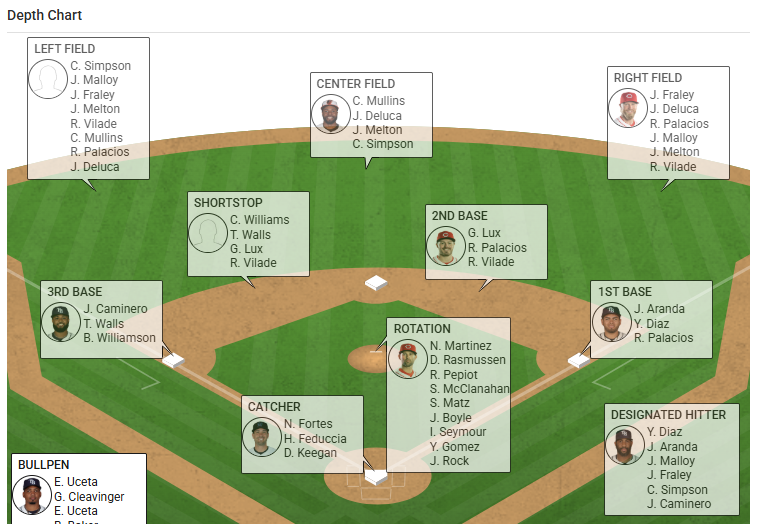
Depth chart visual example
The following widget-style visualization is a common way to render depth charts by position and role.
A practical pattern is to render “current roster” pages from Team Profile, fall back to Team Full Roster for broader player discovery, and rely on Team Depth Chart (or League Depth Chart) for position ordering rather than inferring depth from roster lists.
4. Monitor roster movement with transactions and free agents
To detect roster changes during the season and decide which teams to refresh, pull Daily Transactions for the MLB-defined day.
GET https://api.sportradar.com/mlb/{access_level}/v8/{language_code}/league/{year}/{month}/{day}/transactions.{format}This feed is commonly used to detect signings, activations, assignments, options, and other roster moves, then trigger refreshes of Team Profile, Team Full Roster, and the depth chart feeds for impacted teams.
{
  "start_time": "2025-07-05T08:00:00+00:00",
  "end_time": "2025-07-06T07:59:58+00:00",
  "players": [
    {
      "id": "86b68e79-a041-4fe2-95ea-1e8e0c30e382",
      "full_name": "Corbin Carroll",
      "transactions": [
        {
          "desc": "The Arizona Diamondbacks activated OF Corbin Carroll from the 10-day injured list.",
          "transaction_type": "Activated",
          "transaction_code": "ACT",
          "last_modified": "2025-07-05T16:45:32+00:00"
        }
      ]
    }
  ]
}
To track players who are not currently rostered to a team, pull Free Agents.
GET https://api.sportradar.com/mlb/{access_level}/v8/{language_code}/league/free_agents.{format}This supports both off-season and in-season monitoring of unsigned players.
{
  "league": {
    "alias": "MLB",
    "name": "Major League Baseball",
    "id": "2fa448bc-fc17-4d3d-be03-e60e080fdc26",
    "free_agents": [
      {
        "full_name": "Clete Thomas",
        "position": "OF",
        "status": "FA",
        "mlbam_id": "460004"
      }
    ]
  }
}
MLB Trade DeadlineRoster movement typically accelerates around the MLB trade deadline (generally late July or early August). During this period, increasing your Transactions polling frequency helps keep roster and depth chart views current.
5. Enrich availability with injuries
To understand injury-based availability at the league level, request Injuries and join the results back to your roster payloads by team.id and player.id.
GET https://api.sportradar.com/mlb/{access_level}/v8/{language_code}/league/injuries.{format}This commonly supports:
- Showing injured players inline on team roster pages
- Filtering depth charts to available players
- Highlighting injured list designations (
D10,D15, etc.)
6. Keep position mapping consistent across roster and game views
If your roster experience links into game experiences, keep position mapping consistent across feeds:
- Lineup position numbers (
1to12) for lineup displays in Daily Summary, Game Summary, and Play-by-Play - Roster
primary_positionvalues (SS,RF,SP,RP, etc.) for roster and depth chart displays
Best Practices
- Do not hardcode team IDs. Use Teams or League Hierarchy to discover valid
team.idvalues. - Use Transactions to drive refreshes. When a player transaction occurs, refresh roster and depth chart feeds for impacted teams.
- Use Team Profile for current roster views and Team Full Roster for broader player discovery.
- Use Team Depth Chart or League Depth Chart for position ordering rather than inferring depth from roster lists.
- Pair Injuries with player
statuswhen you need availability context. - Increase polling during high-churn periods such as Spring Training and the trade deadline.
Updated 7 months ago