
Tracking Lineups and Game Rosters
This integration scenario explains how to retrieve and render MLB starting lineups and game-specific rosters using the Sportradar MLB API. It covers how to discover games, pull lineup and game roster data from Game Summary or Game Extended Summary, interpret lineup position codes, and track in-game lineup changes.
This scenario is commonly used to:
- Display confirmed starting lineups prior to first pitch
- Render full game rosters (starters, bench, bullpen)
- Track lineup changes during a game (substitutions, pinch hitters/runners, pitching changes)
- Support live game UI components tied to lineup events
Overview
In the MLB API, lineups and game rosters are game-specific datasets.
- A starting lineup represents the batting order and fielding positions for a specific game.
- A game roster represents all players active and available for that specific game, including starters, bench players, and bullpen pitchers.
Unlike season-level team rosters, both of these datasets are tied directly to a game.id and may change as game status evolves.
From an integration perspective, applications typically:
- Use schedule feeds to discover
game.id - Retrieve lineup and game roster data via Game Summary or Game Extended Summary
- Map lineup position codes for display
- Refresh leading up to first pitch and during the game
Before You Start: Lineup and Game Roster Timing
MLB provides starting lineups a few hours prior to game time.
Sportradar also supports both game rosters and injury updates:
- Game Rosters: The initial game roster is provided a few hours before the game after starting lineups are announced.
- Injuries: Rosters and injury reports are monitored for updates. If an injury is indicated, the associated player is updated in the feed.
Difference Between Lineup and Game RosterA lineup is a subset of the game roster, representing the batting order and defensive positions, while the game roster includes all players available for that game.
Relevant Feeds
| Feed | Purpose |
|---|---|
| League Schedule / Daily Schedule | Discover games and retrieve game.id values. |
| Daily Summary | Retrieve daily game summaries, including probable pitchers, lineups, and game rosters. |
| Game Summary | Retrieve core game data, game rosters, lineup information, and probable pitcher details. |
| Game Extended Summary | Retrieve lineup data plus detailed game context and substitution tracking. |
| Daily Change Log | Detect game-level updates without polling full game payloads. |
| Injuries | Retrieve league-wide injury updates (optional enrichment). |
Display Probable PitchersIf you have Push access, use Push Probable Pitchers for real-time updates to probable pitchers 5–7 days in advance of a game.
If you don’t have Push access, you can still retrieve probable pitcher data through the Game Summary or Daily Summary, which include a
probable_pitcherelement in the response.
High-Level Workflow
A typical lineup and game roster integration follows this flow:
Schedule → Game ID → Probable Pitchers (Optional) → Game Summary / Extended Summary → Lineup & Game Roster Rendering
- Retrieve a schedule feed and identify the target
game.id. - Pull probable pitchers 5–7 days prior to the game (optional, for early pitching displays before lineup confirmation).
- Call Game Summary or Game Extended Summary as lineup confirmation approaches.
- Render starting lineup and game roster data.
- Refresh leading up to game time and during live play.
Integration Steps
1. Discover the Game IDs You Need
Lineups and game rosters are retrieved per game.
Use:
- League Schedule for a full season view
- Daily Schedule for a date-specific lineup page
Extract and store the desired game.id values.
2. Retrieve Probable Pitchers (Available 5-7 Days Prior)
Probable pitchers are accessible days in advance of a game via the Push Probable Pitchers, Daily Summary, or Game Summary feeds. If your application displays pitching matchups ahead of lineup confirmation, you can begin populating this data 5–7 days before first pitch.
GET https://api.sportradar.com/mlb/{access_level}/stream/en/probables/subscribe "probable":{
"updated":"2022-10-26T20:05:57Z",
"team":{
"name":"Phillies",
"market":"Philadelphia",
"abbr":"PHI",
"id":"2142e1ba-3b40-445c-b8bb-f1f8b1054220"
},
"previous":{
"last_name":"Wheeler",
"first_name":"Zachary",
"preferred_name":"Zack",
"jersey_number":"45",
"id":"f2c07e82-71e8-4c76-962b-3a7739a11626"
},
"new":{
"last_name":"Nola",
"first_name":"Aaron",
"preferred_name":"Aaron",
"jersey_number":"27",
"id":"ded1b30d-52ca-4eec-bce6-251b15b085ac"
}
}
},For example, the Push Probable Pitchers feed delivers incremental updates when a probable pitcher is created or changed. Each message includes:
game.id- Team context
newprobable pitcherpreviousprobable pitcher (on updates)updatedtimestamp
This allows you to reflect pitching changes immediately without polling game endpoints. Use the Game Summary or Daily Summary, if you don't have Push access.
3. Retrieve Lineups and Game Rosters
Use one of the following endpoints:
GET https://api.sportradar.com/mlb/{access_level}/v8/{language_code}/games/{game_id}/summary.{format}GET https://api.sportradar.com/mlb/{access_level}/v8/{language_code}/games/{game_id}/extended_summary.{format}Game Summary is appropriate for most pregame and standard live lineup rendering.
Game Extended Summary is recommended if you need deeper support for in-game lineup changes, scoring context, or substitution sequencing.
4. Render the Starting Lineup
Within each team object (home and away), use the lineup array.
      "lineup": [
        {
          "id": "2527770b-cf48-42b9-81fa-9323756fb311",
          "inning": 0,
          "order": 0,
          "position": 1,
          "sequence": 1
        },
        {
          "id": "7f92278a-91c4-4c25-9e75-eaff3aed89b3",
          "inning": 0,
          "order": 1,
          "position": 10,
          "sequence": 2
        },
        {
          "id": "520079c8-a8d6-432b-8dcb-fa3c2ba1468b",
          "inning": 0,
          "order": 2,
          "position": 7,
          "sequence": 3
        },
Each lineup entry typically includes:
id– player IDorder– batting order positionposition– numeric lineup position codeinning– inning when the player enteredinning_half– half-inning context for substitutionssequence– lineup change sequence number
Use order to sort the batting lineup (1–9, ascending order).
Use position to render the defensive role.
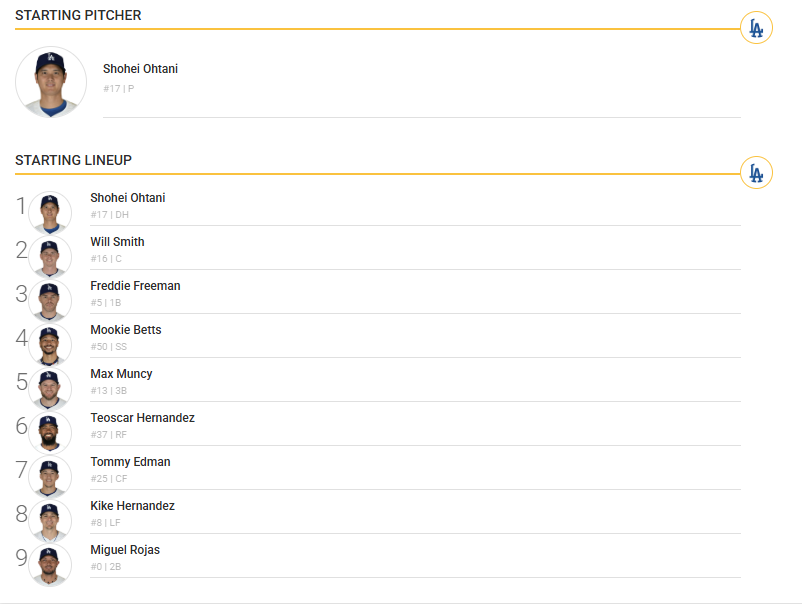
This example shows how Game Summary or Game Extended Summary data can be rendered as a starting pitcher and ordered batting lineup for a specific game.
5. Map Lineup Position Codes
Lineup positions are numeric (1–12). Map them to human-readable labels:
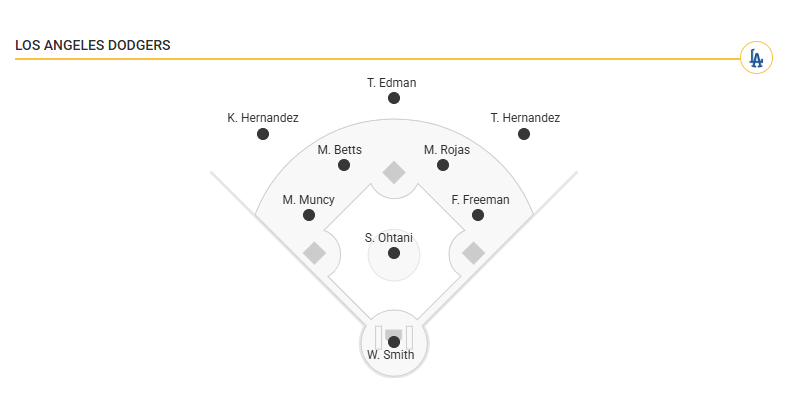
1= Pitcher2= Catcher3= First Base4= Second Base5= Third Base6= Shortstop7= Left Field8= Centerfield9= Right Field10= Designated Hitter11= Pinch Hitter12= Pinch Runner
The following example illustrates how numeric lineup position codes (1–9, 10–12) translate to defensive field positions when rendered visually.
6. Render the Game Roster
Game Summary and Extended Summary also include a game-specific roster list for each team.
This represents all active players available for that game, including:
- Starting players
- Bench players
- Bullpen pitchers
The game roster supports:
- Substitution tracking
- Bench and bullpen displays
- Injury or availability context
- Player profile linking
The game roster is found in the roster array under each team object.
 <home name="Blue Jays" market="Toronto" abbr="TOR" id="1d678440-b4b1-4954-9b39-70afb3ebbcfa" runs="4" hits="14" errors="0" win="10" loss="8">
    <probable_pitcher preferred_name="Max" first_name="Maxwell" last_name="Scherzer" id="2527770b-cf48-42b9-81fa-9323756fb311" full_name="Max Scherzer" win="1" loss="0" era="4.5"/>
    <starting_pitcher preferred_name="Max" first_name="Maxwell" last_name="Scherzer" id="2527770b-cf48-42b9-81fa-9323756fb311" full_name="Max Scherzer" win="1" loss="0" era="4.5"/>
    <roster>
      <player preferred_name="Mason" first_name="Mason" last_name="Fluharty" jersey_number="68" id="04c6998c-a48a-4683-8d75-f985ad89b491" full_name="Mason Fluharty" status="A" position="P" primary_position="RP"/>
      <player preferred_name="Eric" first_name="Eric" last_name="Lauer" jersey_number="56" id="0631a6ce-c41b-4dec-8f68-db2bd61b54a0" full_name="Eric Lauer" status="A" position="P" primary_position="SP"/>
      <player preferred_name="Andrés" first_name="Andrés" last_name="Giménez" jersey_number="0" id="0d84b0e6-869f-4b15-8eea-0d8444c49906" full_name="Andrés Giménez" status="A" position="IF" primary_position="2B"/>
      <player preferred_name="Ty" first_name="Tyler" last_name="France" jersey_number="2" id="0ff1ba0b-2e3d-4fcc-8419-057d0833f887" full_name="Ty France" status="A" position="IF" primary_position="1B"/>
      <player preferred_name="Seranthony" first_name="Seranthony" last_name="Domínguez" jersey_number="48" id="1b02041b-941f-46af-a52e-79072e0e2a33" full_name="Seranthony Domínguez" status="A" position="P" primary_position="RP"/>
7. Handle In-Game Lineup Changes
During live games:
- Monitor
sequenceto detect lineup updates - Use
inningandinning_halfto understand when substitutions occurred - Update your UI accordingly for pitching changes, pinch hitters, and defensive swaps
 {
          "id": "283f2c57-6441-4173-b5a0-728e46b8c894",
          "inning": 10,
          "order": 4,
          "position": 4,
          "sequence": 18,
          "inning_half": "T"
        },
        {
          "id": "1b02041b-941f-46af-a52e-79072e0e2a33",
          "inning": 10,
          "order": 0,
          "position": 1,
          "sequence": 19,
          "inning_half": "T"
        },
        {
          "id": "5a6d40fb-f37a-415d-bae6-83fd66bb3322",
          "inning": 11,
          "order": 0,
          "position": 1,
          "sequence": 20,
          "inning_half": "T"
        }
Accessing Historical LineupsTo retrieve past starting lineups and game rosters for completed games, use the Daily Summary feed with the desired historical date.
Daily Summary returns finalized lineup and roster data for all games on a given day, making it suitable for historical lineup pages, research tools, and archival views.
For broader guidance on retrieving historical MLB data, see Retrieving Historical Data.
Common Use Cases
- Pregame lineup pages
- Confirmed starting lineup displays
- Live lineup trackers with substitution indicators
- Game roster panels (starters, bench, bullpen)
- Injury-aware lineup displays
Best Practices
- Refresh according to the MLB update frequency guidance to ensure your application captures lineup confirmations, roster updates, and late pregame adjustments.
- Use the Daily Change Log to detect when a game has been updated, reducing the need to repeatedly poll full Game Summary or Game Extended Summary payloads.
- Use Push Probable Pitchers for early matchup displays, and transition to Game Summary polling as lineup confirmation approaches.
- Increase polling frequency as the scheduled start time approaches, since starting lineups are typically published a few hours prior to the game.
- During live games, continue polling Game Summary or Game Extended Summary to detect substitutions and pitching changes using
sequence,inning, andinning_half. - Monitor the Injuries feed for roster-related updates that may impact player availability.
Updated 7 months ago