
Retrieving Game, Season, and Split Statistics
This integration scenario explains how to retrieve and render MLB game statistics, season-to-date statistics, player profile data, and statistical splits using the Sportradar MLB API. It covers both team and player performance data, including game-level boxscore statistics, full season aggregates, situational splits, pitch metrics, and advanced statistical leaders.
This scenario is commonly used to:
- Display team and player boxscore statistics
- Build player stat pages and profile pages
- Render team season dashboards
- Power split views (home/away, day/night, venue, handedness, etc.)
- Support advanced pitch metrics and Statcast leaderboards
This scenario focuses strictly on performance statistics and splits. Standings, rankings, and awards are covered separately in the Retrieving Standings and Rankings integration scenario.
Overview
MLB statistics are available at multiple levels:
- Game-level statistics (single game performance)
- Season-level statistics (cumulative totals by season and season type)
- Split statistics (performance segmented by situation or context)
- Advanced metrics (Statcast and pitch-level metrics)
- Player Profile data (biographical information plus current and historical season totals)
From an integration perspective:
- Game Summary / Extended Summary provide per-game team and player stats
- Seasonal Statistics provide cumulative team and roster-level totals
- Seasonal Splits provide contextual breakdowns
- Player Profile provides player bio data plus historical season totals and splits
- Seasonal Pitch Metrics provide advanced pitch analytics
- League Leaders provide traditional season leaderboards (batting, pitching, etc.)
- Statcast Leaders provide advanced tracking-based leaderboards
These feeds can be combined to build complete team pages, player profile pages, comparison tools, and advanced analytics dashboards.
Before You Begin: Seasonal Stat Update Timing
Most MLB statistics update shortly after a game is finalized. However, certain advanced seasonal metrics update once daily during the MLB season rather than immediately after each game.
If your application displays advanced metrics, be aware they may not reflect the most recently completed game until the next daily update cycle.
Examples of these metrics include the following:
| Metric | Definition |
|---|---|
war | Wins Above Replacement. A comprehensive metric estimating how many wins a player contributes above a replacement-level player. Applies to both hitters and pitchers. |
woba | Advanced offensive metric that assigns run values to different offensive outcomes (1B, 2B, HR, BB, etc.) to measure overall offensive contribution. |
wraa | Measures the number of runs a player contributes above league average based on wOBA. |
era_minus | ERA adjusted for league and park factors. Scaled so 100 is league average; lower than 100 is better. |
fip | Pitching metric estimating performance based only on strikeouts, walks, hit batters, and home runs allowed. |
xfip | Variation of FIP that normalizes home run rate to league-average HR/FB ratio. |
wgdp | Weighted metric evaluating the run impact of grounding into double plays relative to league context. |
Mid-Season Team Changes
Additionally, when players switch teams mid-season:
- Season statistics are divided by team
- Separate team entries are provided
- An overall cumulative season total is also available
Design your UI accordingly if you display both team-specific and full-season totals.
Relevant Feeds
The following feeds provide MLB game, season, split, and advanced statistical data for teams and players.
| Feed | Purpose |
|---|---|
| Game Boxscore | High-level, structured boxscore statistics for a single game |
| Game Summary | Game-level team and player statistics |
| Game Extended Summary | Expanded game statistics and substitution tracking |
| Event Tracking | Event-level tracking data for all players on the field during a specific event (available with Statcast access) |
| Seasonal Statistics | Season-to-date team and roster totals |
| Seasonal Splits | Season-to-date split breakdowns |
| Player Profile | Player bio data, historical season totals, and splits |
| Seasonal Pitch Metrics | Advanced seasonal pitch analytics |
| League Leaders | Traditional season leaderboards (batting and pitching categories) |
| Statcast Leaders | League-wide Statcast leaderboards |
| Glossary | Translate statistical and metric identifiers |
| Daily Change Log | Monitor stat revisions and updates |
High-Level Workflow
A typical statistics integration follows this flow:
Schedule or Season → IDs → Game Stats (Live and Postgame) → Season Stats and Splits → Player Profile → Advanced Metrics
- Identify the
season_yearandseason_typecontext - Retrieve team, player, and game IDs
- Pull game-level stats
- Pull season-level statistics and splits
- Retrieve Player Profile data for detailed player pages
- Enrich player profile data with advanced metrics
Integration Steps
Although there are multiple ways to access Sportradar statistics, the following steps represent a common and recommended integration flow.
1. Identify Season Context and Required IDs
Start by determining the correct:
season_yearseason_type(e.g., PRE, REG, PST, AST, WBC)
Then retrieve the necessary identifiers:
team.idplayer.idgame.id(if building game-level views)
Season and schedule discovery are covered in the Pulling Schedules guide, but at minimum your statistics workflow must establish these values before making downstream calls.
2. Retrieve Game-Level Statistics (Live and Postgame)
For single-game team and player statistical views, reference:
GET /mlb/{access_level}/v8/{language_code}/games/{game_id}/summary.{format}<scoring>
<inning number="1" sequence="1" runs="0" hits="1" errors="0"/>
<inning number="2" sequence="2" runs="0" hits="2" errors="0"/>
<inning number="3" sequence="3" runs="3" hits="3" errors="0"/>
<inning number="4" sequence="4" runs="0" hits="1" errors="0"/>
<inning number="5" sequence="5" runs="0" hits="1" errors="0"/>
<inning number="6" sequence="6" runs="1" hits="2" errors="0"/>
<inning number="7" sequence="7" runs="0" hits="1" errors="0"/>
<inning number="8" sequence="8" runs="0" hits="1" errors="0"/>
<inning number="9" sequence="9" runs="0" hits="1" errors="0"/>
<inning number="10" sequence="10" runs="0" hits="0" errors="0"/>
<inning number="11" sequence="11" runs="0" hits="1" errors="0"/>
</scoring>
<statistics>
<hitting>
<overall ab="43" lob="31" rbi="4" abhr="43" abk="3.583" bip="30" babip="0.433" bbk="0.333" bbpa="0.078" iso="0.139" obp="0.408" ops="0.873" seca="0.233" slg="0.465" xbh="4" pitch_count="192" lob_risp_2out="7" team_lob="14" ab_risp="17" hit_risp="3" rbi_2out="0" linedrive="18" groundball="9" popup="1" flyball="5" ap="51" avg=".326" gofo="1">
<onbase s="10" d="3" t="0" hr="1" tb="20" bb="3" ibb="1" hbp="2" fc="1" roe="0" h="14" ci="0" rov="0" cycle="0"/>
<runs total="4"/>
<outcome klook="37" kswing="22" ktotal="59" ball="63" iball="0" dirtball="7" foul="28"/>
<outs po="1" fo="4" fidp="0" lo="5" lidp="0" go="9" gidp="1" klook="1" kswing="11" ktotal="12" sacfly="0" sachit="2"/>
<steal caught="1" stolen="1" pct="0.5" pickoff="0"/>
<pitches count="192" btotal="72" ktotal="120"/>
</overall>These endpoints support:
- Live boxscore and statistical tracking during games
- Postgame statistics rendering
- Historical single-game stat retrieval
The following example illustrates how Game Summary data can be rendered as a traditional boxscore view, displaying individual player performance for a single game.
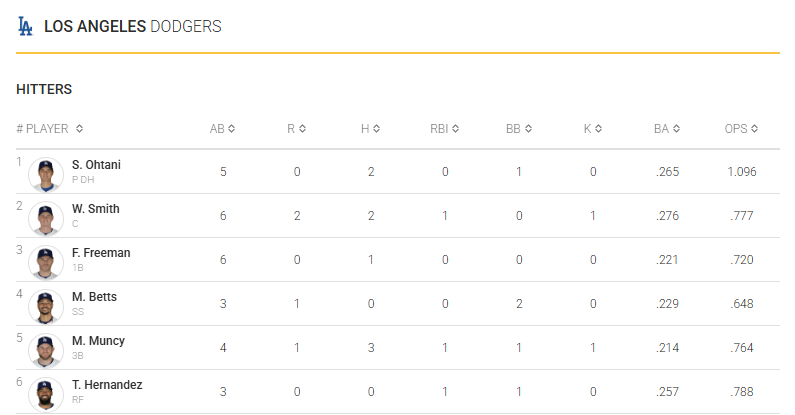
Game feeds update during live play and remain available after games are final, making them suitable for both live experiences and archived game pages.
For live sequencing and state management, see the Tracking Live Games integration scenario.
3. Retrieve Season-Level Team and Player Statistics
Season-level totals require a team.id, season_year, and season_type. You can access seasonal stats by calling the Seasonal Statistics feed.
GET /mlb/{access_level}/v8/{language_code}/seasons/{season_year}/{season_type}/teams/{team_id}/statistics.{format}<season xmlns="http://feed.elasticstats.com/schema/baseball/v8/statistics.xsd" id="a91f72a5-9812-4acd-b3fd-482cb31468cd" year="2025" type="REG">
<team name="Diamondbacks" market="Arizona" abbr="AZ" id="25507be1-6a68-4267-bd82-e097d94b359b">
<statistics>
<hitting>
<overall ab="5480" lob="2335" rbi="768" abhr="25.607" abk="4.164" bip="4014" babip="0.29" bbk="0.414" bbpa="0.088" iso="0.182" obp="0.325" ops="0.758" seca="0.296" slg="0.433" xbh="529" pitch_count="24049" lob_risp_2out="584" team_lob="1112" ab_risp="1379" hit_risp="344" rbi_2out="262" linedrive="978" groundball="1799" popup="297" flyball="1191" ap="6210" avg=".251" gofo="0.99">
<onbase s="848" d="277" t="38" hr="214" tb="2372" bb="524" ibb="21" hbp="81" fc="127" roe="29" h="1377" ci="3" rov="0" cycle="0"/>
<runs total="791"/>
<outcome klook="4101" kswing="2725" ktotal="6826" ball="8036" iball="0" dirtball="505" foul="4333"/>
<outs po="292" fo="850" fidp="3" lo="368" lidp="6" go="1378" gidp="109" klook="294" kswing="1022" ktotal="1316" sacfly="64" sachit="37"/>
<steal caught="39" stolen="121" pct="0.756" pickoff="12"/>
<pitches count="24049" btotal="8622" ktotal="15427"/>
</overall>This endpoint returns:
- Cumulative team hitting, pitching, and fielding totals
- Pitching breakdowns (overall, starters, bullpen)
- Full roster season statistics
Seasonal aggregates reflect the cumulative results of completed games and update as official game statistics are finalized.
Know When Seasonal Stats UpdateEnsure to familiarize yourself with the data entry workflow and update frequencies so you know when to expect seasonal stat updates.
The response also includes player-level season totals, which provide the player.id needed for deeper player-specific integrations.
4. Retrieve Seasonal Splits
To add contextual breakdowns, call the Seasonal Splits feed.
GET /mlb/{access_level}/v8/{language_code}/seasons/{season_year}/{season_type}/teams/{team_id}/splits.{format}Split data complements cumulative totals by breaking stats into the following categories:
- Day vs Night
- Home vs Away
- Venue-specific performance
- Other situational contexts
Splits are ideal for filtered dashboards and comparative analysis modules that highlight team performance across different contexts.
5. Enrich Your Experience with Player Profile Data
With a player.id obtained from Seasonal Statistics, retrieve career and cross-team context with the Player Profile endpoint.
GET /mlb/{access_level}/v8/{language_code}/players/{player_id}/profile.{format}This feed provides:
- Player biographical information
- Team history
- Multi-season statistics
- Cross-season performance totals
The Player Profile endpoint is particularly useful when building full player pages that extend beyond a single team-season view.
6. Add Advanced Metrics, Leaderboards, and Drilldown Analytics
To provide league-wide context and ranking views, integrate both traditional and advanced leaderboards.
For standard seasonal leaderboards across batting and pitching categories, use the League Leaders feed:
GET /mlb/{access_level}/v8/{language_code}/seasons/{season_year}/{season_type}/leaders/statistics.{format}League Leaders supports:
- Traditional batting and pitching leaders
- Category-based ranking views
- Season leader modules for AL, NL, or MLB-wide comparisons
For advanced tracking-based leaderboards, use the Statcast Leaders feed:
GET /mlb/{access_level}/v8/{language_code}/seasons/{season_year}/{season_type}/leaders/statcast.{format}Statcast Leaders supports:
- Exit velocity and launch speed rankings
- Advanced batted-ball and tracking metrics
- “Top 10” Statcast-based modules
To enable deeper player-level analysis behind those rankings, use Seasonal Pitch Metrics:
GET /mlb/{access_level}/v8/{language_code}/players/{player_id}/pitch_metrics.{format}Seasonal Pitch Metrics provide:
- Pitch-type usage distribution (FA, CH, CU, etc.)
- Average, minimum, and maximum velocity
- Swing rate, strike percentage, and whiff rate
- Multi-season pitch analytics for trend analysis
For event-level tracking data during a specific play or pitch, use the Event Tracking endpoint (Statcast access required):
GET /mlb/{access_level}/v8/{language_code}/games/{game_id}/events/{event_id}/tracking.{format}Event Tracking provides:
- Pitch-level tracking data and strike zone coordinates
- Batted-ball metrics such as launch speed, launch angle, and projected distance
- Runner movement and outcomes
- Advanced tracking metrics for all players on the field during that event
How They Work Together
A common pattern is:
- Display leaders using League Leaders or Statcast Leaders
- Allow users to select a ranked player
- Retrieve Seasonal Pitch Metrics using that
player.id - Link to a specific game or play
- Retrieve Event Tracking data using
game_idandevent_id - Surface detailed pitch mix, tracking coordinates, and on-field player metrics
This progression supports high-level ranking views, player-level analytical drilldowns, and event-level tracking insights within the same experience. For more on standings and official rankings, see Retrieving Standings and Rankings.
Best Practices
- Use consistent team and player IDs across feeds.
- Combine Seasonal Statistics with Seasonal Splits for filterable dashboards.
- Use Player Profile for career totals and full-season aggregates across multiple teams, and use Seasonal Statistics when you need team-specific season totals by stint.
- Use League Leaders for traditional statistical categories and Statcast Leaders for advanced tracking-based metrics.
- Clearly label advanced metrics such as WAR and wOBA for end users.
- Cache season-level data appropriately, since updates are less frequent than live game feeds.
- Be aware that certain advanced seasonal metrics update daily rather than immediately after games conclude.
- Use the Daily Change Log to monitor postgame updates and seasonal stat revisions.
Updated 7 months ago